

Here’s how to delete a Google review you wrote, or edit it instead: both options sit behind the same three-dot menu next to your review in Google Maps. You can only do this for your own reviews. The screenshots below are from my own Google account, taken on November 4, 2026, using a review I wrote for a gym in my city.
If you’re a business owner trying to get rid of a review a customer left, this isn’t the guide you need. Skip to the For business owners box at the end.
Before you delete: edit or delete?
Think about what you want the review to say. Deleting removes the text, the stars and any photos you attached to that review. Editing keeps the review but changes what it says.
- Delete it if you reviewed the wrong place, posted by accident, or no longer want your name attached to it.
- Edit it if the business fixed a problem, your opinion changed, or you want to add details or photos.
One thing to know before editing: Google shows the date of your last edit as the review’s date. An old review you update will look like a new one.
How to delete a Google review on a computer
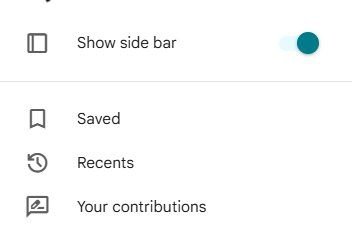
Open Your contributions
Go to google.com/maps and sign in with the account you used for the review. Click the Menu (three lines) at the top left, then Your contributions.
Open the Reviews tab
Click Reviews. You’ll see every review you’ve posted publicly, newest first.
Click the three dots next to the review
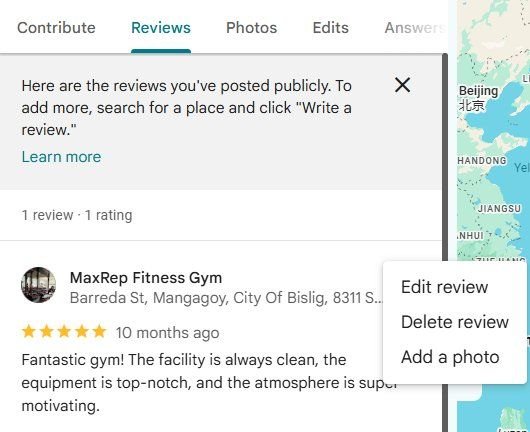
Find the review and click More (the three dots) on its right.
Choose Delete review
Select Delete review and confirm. To change it instead, choose Edit review.
The Reviews tab opens with a note saying these are the reviews you’ve posted publicly. Mine showed “1 review · 1 rating”, because Google counts star ratings without text separately. Both kinds have the same three-dot menu.
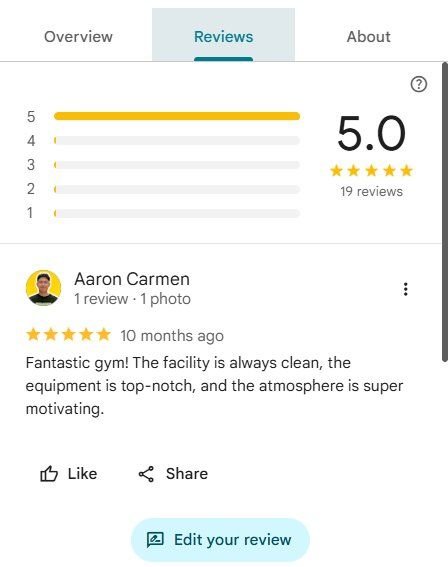
The faster way: from the business’s own page
If you know which business it is, search for it in Google Maps and open its Reviews tab. When you’re signed in, your own review sits at the top, above everyone else’s, with an Edit your review button underneath and the three dots beside your name.
How to delete a Google review on Android or iPhone
The Google Maps app uses the same menu, but you get to it from the Contribute tab. These are Google’s steps for both Android and iPhone; I took my screenshots on a computer.
- Open the Google Maps app and make sure you’re signed in to the right account.
- Tap Contribute at the bottom, then View your profile.
- Scroll down and tap See all reviews.
- Next to the review, tap More (the three dots).
- Tap Delete review or Edit review and follow the steps on screen.
The shortcut works in the app too: open the business, tap its Reviews tab, and your review should be at the top.
How to edit a Google review
Choose Edit review from the three-dot menu, or Edit your review on the business’s page. The same form you used to write the review opens, with your old text filled in.

From here you can:
- Change the stars. Tap a different number of stars.
- Rewrite the text. Edit it like any text box.
- Add or remove photos. Use Add photos & videos, or the x on a photo to take it off.
Then click Post. Nothing changes until you do, so Cancel is safe if you only wanted to look. The form still says Posting publicly across Google, because an edited review is just as public as the original.
What happens after you delete a review
- It’s gone from Google Maps and Search. Google’s help says your review and score show up until you take them down.
- Your stars come out of the average. The business’s rating no longer includes your score. Google doesn’t say how quickly the average updates.
- There’s no undo. Google doesn’t describe a way to restore a deleted review. If you change your mind, write a new one. It gets a new date.
- Any reply goes too. A business’s reply is attached to the review it answers, so expect it to disappear with yours.
When you can’t find your review
- You’re signed in to a different Google account. This is the most common reason. Check the profile picture at the top right and switch accounts.
- Google removed it. Google takes down reviews that break its content policy, such as reviews with ads, contact details or a conflict of interest. Google says it doesn’t put back reviews removed for policy reasons.
- It was never posted. If you closed the form before tapping Post, there’s nothing to delete. My guide on how to leave a Google review shows what the finished step looks like.
- You’ve lost access to the account. You need to be signed in to delete a review, so recover the account first through Google’s account recovery.
Can you hide your reviews instead?
Not really. Google’s help says all reviews are public and you can’t post an anonymous review. People reading your review can see the name on your Google profile and your other reviews. Some people in Google’s help forum report that a restricted profile limits what others see on your profile page, but the reviews still show on the businesses you reviewed.
If you want a review gone, delete it. If you just don’t want your full name showing, change the name on your Google profile.
