Skip to content
Aaron Carmen

Technical SEO

Technical SEO Services from a Developer Who Fixes What He Finds

Most audits end as a PDF nobody implements. I write the report and then fix the code, so the problems go away.

  • ★★★★★100% Job Success on Upwork
  • Since 2013
  • Clients in US · UK · AU · CA · PH

Who it's for

For sites where something under the hood is holding rankings back

Good content can't rank if Google can't crawl it, index it or load it quickly. This service is for sites with indexing problems, slow pages, recent migrations or messy WordPress installs. It's also for agencies that need a developer who understands SEO and can make the fixes their team recommends.

You need this if...

  • Search Console shows pages as "Discovered, currently not indexed" or "Crawled, not indexed"
  • Your site fails Core Web Vitals, especially on mobile
  • Traffic dropped after a redesign, migration or platform change
  • Duplicate, thin or near-empty pages are spread across the site
  • You've had an audit before, but nobody implemented it

What's included

What technical SEO includes

  • Full crawl audit

    A complete crawl of the site to find broken links, redirect chains, duplicate content, orphan pages and indexing blockers.

  • Indexing and crawl budget fixes

    Make sure Google spends its time on the pages that matter, and that those pages actually get indexed.

  • Core Web Vitals and speed

    Faster loading, steadier layouts and quicker responses, fixed in the code and the hosting setup, not just with plugins.

  • Structured data implementation

    Schema written and deployed across the site, then validated, so Google understands your pages and entities.

  • Redirect mapping and migrations

    Old-to-new URL maps and launch checklists so a redesign or platform move keeps the rankings you've earned.

  • Internal linking architecture

    A site structure that gets authority to your key pages and keeps every page within a few clicks of the home page.

  • Log file analysis

    For larger sites, server logs show what search engine bots actually crawl, and what they're ignoring.

  • Implementation, not just recommendations

    I make the fixes myself, or work directly with your developer, then re-crawl to confirm they worked.

Process

How technical SEO work runs

  1. Step 1: Crawl and diagnose.

    I crawl the site, review Search Console and test speed to build a full list of technical issues.

  2. Step 2: Prioritize by impact.

    Issues get ranked by how much traffic they're likely costing you and how hard they are to fix.

  3. Step 3: Implement fixes.

    I fix the code, templates, redirects and server settings, starting with the highest-impact problems.

  4. Step 4: Re-crawl, validate and report.

    A fresh crawl and Search Console validation confirm the fixes, and the report shows what changed.

Results

Results from this kind of work

Each project was designed, built and optimized by one person, then measured in calls, not compliments.

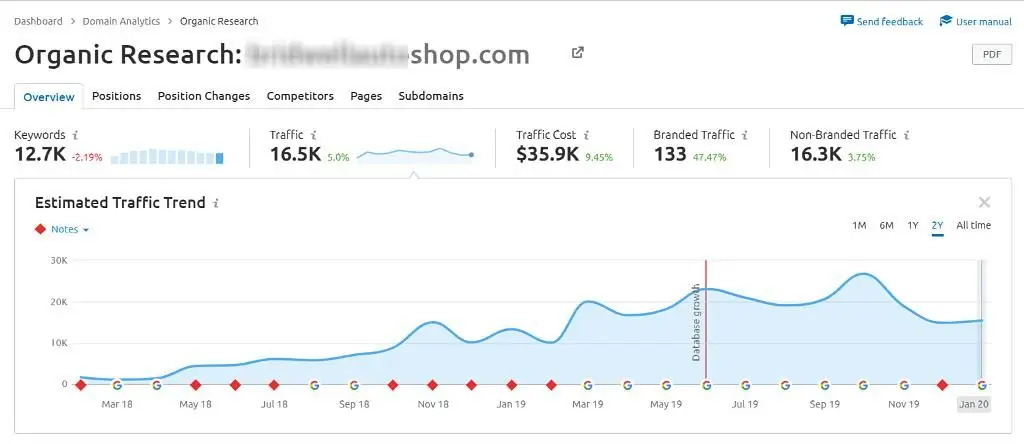
  • Semrush organic research for the transmission shop's website, showing 16.5K monthly organic traffic worth $35.9K and a two-year upward trend

    [01]Auto repair

    Transmission repair shop3,199% more organic traffic in 2 years, with $0 spent on ads

    Organic traffic growth
    +3,199%
    Monthly visits
    16.5K
    Organic traffic value
    $35.9K / mo
    Ad spend
    $0

    90% of the site's visits come from Google organic search. No Google Ads or Facebook ads were run on this site.

See all client results

Aaron is incredibly talented guy, who for me was and is continually supporting and developing my site to date. I have very little knowledge of the world wide web but Aaron is highly recommend to anyone. I live in the UK and communication isn't a problem. Thank you 10/10

James ShipleyEvent Chip Timing, UK

Pricing

How pricing works

The price depends on the size of the site, the platform it runs on and how many of the fixes you want me to implement.

Pricing model
One-time audit, audit plus implementation, or a monthly technical retainer
Price
Custom quote

You get a fixed quote before any work starts, so you know the full cost up front.

Ask for a quote

How technical SEO works

The technical issues that cost the most traffic

Technical SEO covers hundreds of possible issues, but only a handful usually matter. These are the ones I find most often, roughly in order of how much damage they do.

Pages that aren’t indexed

If Google hasn’t indexed a page, it can’t rank. Search Console’s Pages report shows which pages are excluded and why. The most damaging causes are a stray noindex tag (often left over from a staging site), pages blocked in robots.txt, canonical tags pointing at the wrong URL, and pages Google considered too thin or too similar to others to bother indexing.

Redirect problems

Redirect chains (A to B to C), redirect loops and old URLs that return 404 instead of redirecting all leak authority. After a redesign, it’s common to find dozens of old URLs with links pointing at them that now go nowhere. Fixing those redirects is often the fastest technical win there is.

Duplicate and thin pages

Tag pages, filtered URLs, printer versions, www and non-www versions, HTTP and HTTPS: there are many ways one page becomes several. Google has to choose between them, and it doesn’t always choose the one you want. Consistent canonical tags, clean internal links and a few redirects usually solve it.

Slow pages

Speed affects rankings at the margins and conversions a lot. Core Web Vitals measure three things: how fast the main content appears (Largest Contentful Paint), how stable the layout is while loading (Cumulative Layout Shift) and how quickly the page responds when someone taps or clicks (Interaction to Next Paint). Failing them on mobile is common, and fixable.

Why speed fixes fail on page-builder sites

Most slow sites I see are built with a page builder and a stack of plugins. The usual response is to install a caching plugin, then an image plugin, then a “speed” plugin, and the score barely moves. That’s because the real problem is the amount of code the page loads before anything appears.

Page builders tend to load their full CSS and JavaScript on every page, whether a page uses those features or not. Add a slider plugin, a popup plugin, analytics, chat and a few fonts, and the browser has a lot of work to do before the visitor sees anything. Caching helps the server, but it doesn’t reduce what the browser has to process.

The fixes that work are structural. Remove plugins you don’t need. Load scripts only on the pages that use them. Serve modern image formats at the right size. Self-host fonts and load fewer weights. Sometimes the honest answer is that the theme can’t be made fast, and a rebuild costs less than another year of patching. If that’s the case, I’ll say so and explain the options for WordPress development or a faster custom build.

A migration checklist that protects your rankings

Whether you’re redesigning, changing platforms or moving domains, these steps keep the traffic you’ve earned:

  1. Crawl the old site first and export every URL, including ones with backlinks and ones that get organic traffic.
  2. Map every old URL to the most relevant new one. Avoid redirecting everything to the home page, because Google treats that like a 404.
  3. Keep URLs the same wherever you can. The safest redirect is the one you don’t need.
  4. Carry over titles, headings and content on pages that rank well, unless there’s a clear reason to change them.
  5. Test the new site before launch for noindex tags, blocked resources, broken links and missing redirects.
  6. Launch, then monitor daily for two weeks in Search Console, watching for spikes in 404s and drops in indexed pages.
  7. Update your sitemap and resubmit it, and update the most important external links if you can.

A migration done this way usually sees little or no traffic loss. Skipping steps 1, 2 and 5 is behind most of the horror stories.

How to read the Search Console Pages report

The Pages report (under Indexing) is the most useful technical SEO tool you already have for free. A quick guide:

  • Indexed pages should roughly match the number of pages you want in Google. If it’s much lower, something is blocking indexing. If it’s much higher, you probably have duplicate URLs.
  • “Discovered, currently not indexed” means Google knows the page exists but hasn’t crawled it. On a small site this usually points to weak internal linking or low perceived quality.
  • “Crawled, currently not indexed” means Google looked and chose not to index it. The page is often thin, duplicated or not useful enough.
  • “Excluded by noindex tag” should only list pages you meant to hide.
  • “Page with redirect” and “Not found (404)” are normal in small numbers. Look closely if they include pages that used to get traffic.

Technical SEO is the foundation for everything else. Without it, content and link building work harder for less, and even AI SEO depends on pages being crawlable and clearly structured. If you suspect something under the hood is holding your site back, tell me about it below and I’ll send a fixed quote for the audit and the fixes.

Why me

Why work with me

  • I'm a developer first, so the audit comes with working fixes instead of a list for someone else.

  • Doing SEO and web development since 2013, including nine and a half years building and fixing sites inside a dental marketing agency.

  • Every fix is checked in a fresh crawl and in Search Console before I call it done.

  • This site scores in the high 90s on mobile Lighthouse, so you can see the standard I build to.

FAQ

Technical SEO questions

What's in a technical SEO audit?

A full crawl of the site, a review of your Search Console coverage and performance data, speed and Core Web Vitals testing, a check of your structured data, redirects and internal links, and a look at how your templates handle things like pagination and duplicate URLs. You get a prioritized list, ranked by impact, with a clear explanation of each issue.

Do you implement the fixes yourself?

Yes, that's the point of hiring a developer for technical SEO. On WordPress and static sites I make the fixes directly. On other platforms I either implement them within what the platform allows or write precise tickets for your developer and check the result. Either way, I re-crawl afterwards to confirm the problem is gone.

Can you fix Core Web Vitals on WordPress?

Usually, yes. Most WordPress speed problems come from heavy themes, page builders, too many plugins, unoptimized images and slow hosting. The fix is often a mix of removing what isn't needed, serving images properly, cleaning up scripts and sometimes moving hosts. Plugins alone rarely get a slow WordPress site to pass.

Do you handle site migrations?

Yes. Migrations are where sites most often lose traffic, usually because of missing redirects or changed URLs. I map every old URL to its new one, check the new site before launch, handle the redirects and monitor Search Console closely for several weeks afterwards to catch anything that slips through.

How often should I get a technical audit?

A full audit once a year is enough for most small and mid-sized sites, plus a quick check after any redesign, migration or major plugin change. Larger or frequently updated sites benefit from a monthly technical retainer, where problems get caught and fixed as they appear rather than piling up.

Do you work on Shopify or other platforms?

My strongest platforms are WordPress and static sites built with frameworks like Astro, where I can change anything. I can audit any platform, including Shopify and Webflow. On hosted platforms some fixes are limited by what the platform allows, and I'll tell you up front which issues can be fixed and which can only be worked around.

Related

Contact

Get a quote for technical SEO

Tell me about your business and your site. Say what you want to achieve and I'll reply within one business day with any questions, then a fixed quote.

  • Reply within one business day
  • No obligation, no hard sell
  • Form and email only, calls optional
What you need

Prefer email? hello@aaroncarmen.com