
How WordPress development works
Why WordPress sites get slow
WordPress itself isn’t slow. A clean install with a lightweight theme loads quickly. Sites get slow because of what gets added over the years.
Heavy themes
Multipurpose themes are built to do everything for everyone. They load sliders, animations, icon libraries and layout options on every page, even when a page uses none of them. That’s a lot of CSS and JavaScript for the browser to work through before the visitor sees anything.
Plugin pile-up
Every plugin adds code, and many add their own scripts and styles to every page. A site with 40 plugins often has a dozen it doesn’t need: abandoned features, duplicates and leftovers from tests. Each one also needs updating, which is where the “updates break things” problem comes from.
Images
Uploading a 5 MB photo straight from a phone and letting the theme shrink it in the browser is still common. Proper image handling, with modern formats, correct sizes and lazy loading, often cuts page weight in half.
Hosting
Cheap shared hosting can be fine for a small, well-built site. But a heavy site on slow hosting suffers twice. Sometimes the right fix is better hosting, and sometimes it’s a lighter site that doesn’t need it.
Fixing speed properly is part of technical SEO, because Google measures it and visitors notice it.
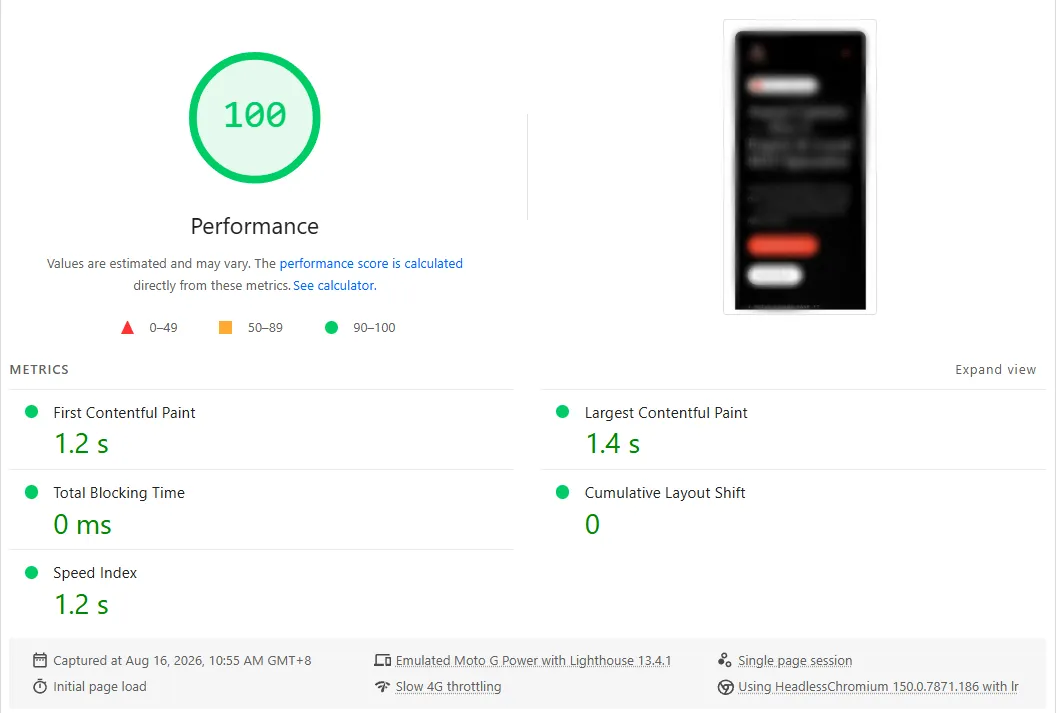
Done properly, a page-builder WordPress site can still hit a perfect score. This is my own site while it ran on WordPress, tested on Google PageSpeed Insights’ mobile setting:
Page builders versus custom themes
Page builders and custom themes both have their place. The right choice depends on who edits the site and how.
Page builders suit teams that want to design and rearrange pages visually, without a developer. The trade-off is weight: builders load more code than a custom theme, and editors with full layout control can easily break the design. Set up carefully, with limited options and global styles, a builder site can still be fast and consistent.
Custom themes with Gutenberg blocks suit teams that mostly edit text and images inside a fixed design. Editors get a simple, safe set of blocks, and the site loads only what it uses. They take more work up front, but they’re usually faster and easier to maintain long term.
If you’re unsure which you need, look at how your team works today. If they mostly update text, a custom theme is usually the better choice. If they regularly build new landing pages from scratch, a well-configured builder may suit them better.
What a proper maintenance plan covers
A WordPress site is software, and software needs maintenance. A proper care plan includes:
- Updates tested before they go live. Core, theme and plugin updates applied on a staging copy first, then pushed live once they’re checked.
- Backups you can actually restore. Daily backups stored off the server, with restores tested now and then.
- Uptime monitoring. An alert the moment the site goes down, not when a customer emails you.
- Security checks. Scans for malware, suspicious logins and outdated components.
- Small fixes included. Text changes, a new page, a broken form. The jobs that otherwise wait for weeks.
- A monthly summary of what was updated, what was fixed and anything that needs a decision.
The alternative is usually no maintenance at all until something breaks, which costs more and always happens at a bad time.
When to move off WordPress entirely
WordPress is the right platform for many businesses, but not all of them. It may be time to move if:
- Your content rarely changes, and you’re paying for maintenance and plugins you barely use.
- Speed is critical, for example for paid landing pages, and you’ve already done the reasonable optimizations.
- Security problems keep recurring despite updates.
- You need features that fight the platform rather than fit it.
In those cases, a custom static site is often faster, safer and cheaper to run. If you’re rebuilding anyway, it’s worth planning the new site around how your customers search so you come out of the move with better rankings than you went in with.
Keeping a WordPress site secure
Most hacked WordPress sites aren’t targeted. They’re found by automated scripts that scan thousands of sites for known weaknesses, usually an outdated plugin or a weak admin password. That means a handful of habits prevents most problems:
- Keep everything updated, especially plugins. Most attacks use weaknesses that were patched long ago.
- Remove what you don’t use. Deactivated plugins and old themes can still be exploited if their files are on the server.
- Use strong, unique passwords and two-factor login for every admin account, and remove accounts for people who’ve left.
- Limit login attempts so bots can’t keep guessing passwords.
- Keep off-site backups, so a worst-case problem becomes a restore instead of a rebuild.
- Choose decent hosting that isolates your site and keeps the server software current.
None of this is exotic. It just has to happen every month, which is exactly what a care plan is for.
If your WordPress site is slow, fragile or hard to change, tell me about it below and I’ll send a fixed quote for the fixes, the rebuild or a care plan.