

WooCommerce payment gateways are where most of a small store’s running cost goes, and which ones you can use depends on where your business is registered. I checked the options in WooCommerce 11.2.1 on a test store and read every fee on the providers’ own sites on October 20, 2026, for both US stores and Philippine stores.
What WooCommerce offers out of the box
In WooCommerce → Settings → Payments, WooCommerce lists payment providers based on your business location. For a US business on my test store it showed WooPayments and PayPal Payments first, then Stripe, Square, Visa Acceptance Solutions, Airwallex and Elavon under More payment options.
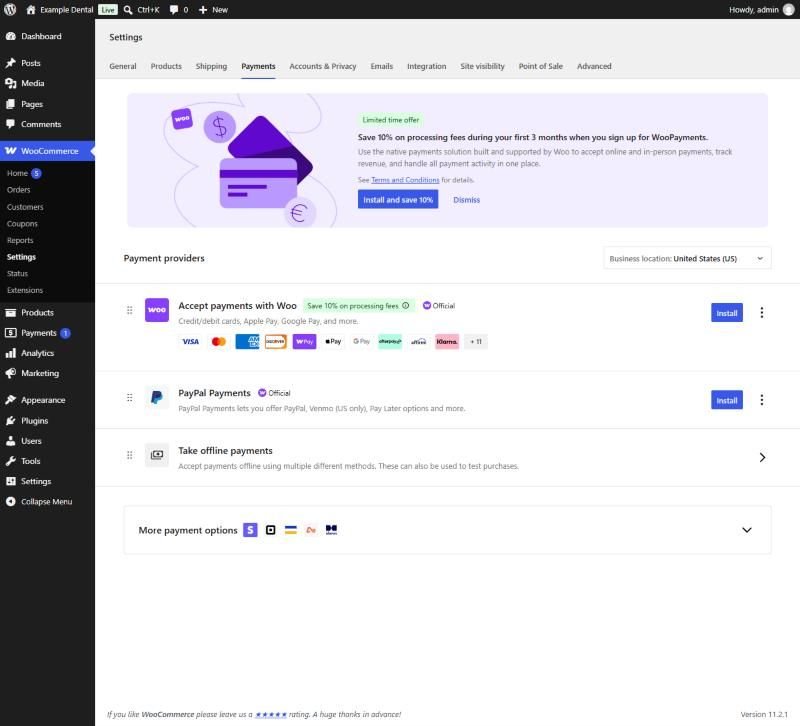
WooPayments was also showing an offer of 10% off processing fees for the first three months. Check what’s offered on your own screen, since it can change.
The same screen has Take offline payments, which covers direct bank transfer, check payments and cash on delivery. These cost nothing in gateway fees because no money passes through a provider, but you confirm each payment by hand before shipping, so they suit low-volume stores or business customers paying by invoice.
US stores: fees for a $50 order
| Gateway | Fee per US card payment | Fee on a $50 order |
|---|---|---|
| WooPayments | 2.9% + 30¢ | $1.75 |
| Stripe | 2.9% + 30¢ | $1.75 |
| Square (online API) | 2.9% + 30¢ | $1.75 |
| PayPal standard card payments | 2.99% + 49¢ | $1.99 |
| PayPal Checkout (PayPal balance, Venmo) | 3.49% + 49¢ | $2.24 |
PayPal also lists advanced card payments at 2.89% plus a fixed fee, and Square’s own hosted Square Online store charges 3.3% + 30¢, which is higher than its online API used by the WooCommerce plugin.
For domestic cards, the three card gateways cost the same, so choose on other things: WooPayments is managed inside WooCommerce, Stripe has the widest range of extra payment methods, and Square suits a business that also sells in person on Square. PayPal costs more per sale, but buyers who prefer PayPal may not buy otherwise, so many stores offer it alongside cards.
Philippine stores: different gateways entirely
If your business is in the Philippines, the US options mostly aren’t available. When I checked, the Philippines wasn’t on WooPayments’ list of supported countries, Stripe’s global availability page, or Square’s supported countries. A Philippine store usually needs a local gateway, such as PayMongo or Xendit, both of which have WooCommerce plugins, plus PayPal for buyers overseas.
Fees for a ₱2,500 order
| Gateway and method | Fee | Fee on ₱2,500 |
|---|---|---|
| PayMongo, Maya | 1.79% | ₱44.75 |
| PayMongo, GCash | 2.23% | ₱55.75 |
| Xendit, Maya | 2.00% + ₱11 | ₱61.00 |
| Xendit, GCash | 3.20% + ₱11 | ₱91.00 |
| PayMongo, local cards | 3.125% + ₱13.39 | ₱91.52 |
| PayPal, domestic sale | 3.40% + ₱15 | ₱100.00 |
PayMongo lists its prices before VAT, so add VAT on the fees. It also charges 4.02% + ₱13.39 for international cards, and 1.34% for QR Ph. Xendit’s fees come in two parts, a payment method fee plus an ₱11 processing fee, which is why a small order costs relatively more there. PayPal charges 5.39% plus a fixed fee for international sales.
PayMongo also listed GrabPay at 1.96%, ShopeePay at 1.70%, direct online banking at 0.71% or ₱13.39, and BillEase buy-now-pay-later at 1.34%. Xendit listed 7-Eleven cash payments at 1.50% (minimum ₱15) plus its ₱11 processing fee, which helps customers without cards or e-wallets.
The pattern is clear: e-wallets cost less than cards in the Philippines, and many customers prefer GCash or Maya anyway. Offering e-wallets first, with cards as an option, usually lowers your average fee.
Getting paid
- PayMongo described its standard settlement as taking 2 to 7 days, with instant settlement available at extra cost.
- PayMongo charged 2.23% for instant settlement and ₱10 per payout to your bank, according to the same page.
- PayPal keeps sales in your PayPal balance. Withdrawing to a Philippine bank account was free above ₱7,000, and ₱50 for smaller withdrawals.
Small orders cost more, proportionally
Fixed fees take a bigger share of small orders. On a $10 US order, a 2.9% + 30¢ card payment costs 59¢, or 5.9% of the sale, and PayPal Checkout at 3.49% + 49¢ costs 84¢, or 8.4%. In the Philippines, a ₱500 order paid with GCash costs ₱11.15 through PayMongo but ₱27.00 through Xendit, because of Xendit’s ₱11 processing fee. If most of your orders are small, a gateway without a fixed fee per transaction saves the most.
What I didn’t test
I didn’t run live payments: all fees here are the providers’ published rates, not amounts taken from real transactions. Your account may get different rates, for example with volume discounts or currency conversion. I also couldn’t see WooCommerce’s list for a Philippine business: changing the business location to the Philippines didn’t save on my test store, so the Philippine section is based on each provider’s own availability and pricing pages.
How to choose
- Check availability first. Your business’s registered country decides which gateways you can sign up for.
- Offer the methods your customers use. In the US that’s cards plus PayPal. In the Philippines it’s GCash and Maya first.
- Compare on your average order. Fixed fees matter more on small orders, percentages on large ones.
- Keep it to two or three. Each gateway is another plugin to update and another account to reconcile.
For a full cost comparison of a WooCommerce store against a hosted platform, see WooCommerce vs Shopify. If you’d like the payments set up and tested on your store, including local e-wallets, that’s part of my WordPress development work.
