

WooCommerce shortcodes used to build whole stores: the cart, checkout, account pages and product grids. They still work, but new stores now build some of those pages with blocks instead. I tested every shortcode registered by WooCommerce 11.2.1 on a test store to show which still matter and what each one produces.
What changed: cart and checkout use blocks
When I installed WooCommerce 11.2.1, it created four pages. Two of them don’t use shortcodes any more:
| Page | What WooCommerce 11.2.1 created |
|---|---|
| Cart | The Cart block |
| Checkout | The Checkout block |
| My Account | The [woocommerce_my_account] shortcode |
| Shop | An empty page, filled in by the theme’s template |
So on a new store, you’ll only see [woocommerce_cart] and [woocommerce_checkout] if you add them yourself. On stores set up a few years ago, those pages often still use the shortcodes, and they still work: [woocommerce_cart] showed “Your cart is currently empty” on my test store.
The shortcodes worth knowing
[products]: the one you’ll use most
[products] shows a grid of products, filtered however you like. On my test store:
[products ids="53,54" columns="2"]showed the two products I named, in two columns.[products category="uncategorized" limit="3"]showed three products from that category.
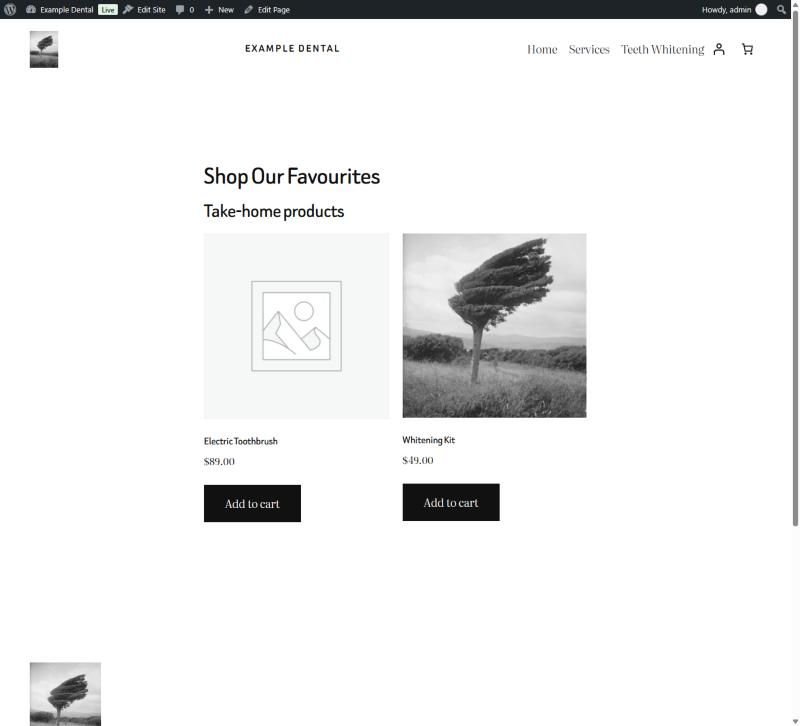
The numbers are product IDs. If you don’t know them, my guide to finding a product ID in WooCommerce shows where they are.
[products] options, tested
[products] takes options that cover most of what the older single-purpose shortcodes did. Each of these worked on my test store:
| Shortcode | What it showed |
|---|---|
[products skus="WK-01,TB-02"] |
The two products with those SKUs, so you can use SKUs instead of IDs |
[products orderby="price" order="DESC" limit="3"] |
Most expensive first: Night Guard, Electric Toothbrush, Whitening Kit |
[products orderby="price" order="ASC" limit="3"] |
Cheapest first, the same three in reverse |
[products limit="2" paginate="true"] |
Two products with page links and “Showing 1–2 of 3 results” |
[products ids="53" class="featured-pick"] |
The product, wrapped in a CSS class you can style |
[products ids="999"] |
Nothing, because no product has that ID |
Drafts don’t appear: a draft copy of the Whitening Kit on my test store never showed in any of these lists, which is what you want while you’re still editing a product.
Single products and buttons
[product_page id="53"]puts a whole product section on any page: title, price, quantity box, Add to cart, SKU and reviews. Useful for a landing page selling one product.[add_to_cart id="53"]shows just the price and an Add to cart button.[add_to_cart_url id="53"]prints only the link, for use in your own button. On my test store it built the link from the current page’s address withadd-to-cart=53added.
Account and orders
[woocommerce_my_account]is still what new stores use for the My Account page. Logged out, it showed the login form.[woocommerce_order_tracking]shows a form where customers enter their order number and billing email.
The full list, as tested
All 25 shortcodes were registered on WooCommerce 11.2.1:
| Shortcode | Result on my test store |
|---|---|
[products] |
Product grid filtered by ID, category and more |
[product_page] |
A full product section, as above |
[product] |
One product as a single grid item, with its price and button |
[product_category] |
Products from one category |
[product_categories] |
A list of categories with product counts |
[add_to_cart], [add_to_cart_url] |
A button, or just the link |
[recent_products], [best_selling_products], [top_rated_products] |
Still render; [products] with sorting options can do the same |
[featured_products], [sale_products] |
Empty until you mark products featured or on sale |
[product_attribute] |
Empty for attributes set on single products; needs a global attribute |
[related_products] |
Registered; not rendered in my test |
[woocommerce_cart], [woocommerce_checkout] |
Classic cart and checkout; checkout is empty when the cart is |
[woocommerce_my_account], [woocommerce_order_tracking] |
Account area and order tracking form |
[shop_messages] |
Store notices; empty when there are none |
[woocommerce_messages] |
Registered; not rendered in my test |
[product_brand] and four other brand shortcodes |
Registered by WooCommerce’s built-in Brands; not rendered in my test |
The block that replaces each one
If you’re building new pages in the block editor, each main shortcode has a block equivalent in WooCommerce 11.2.1:
| Shortcode | Block |
|---|---|
[products] |
Product Collection |
[product_page] |
Single Product |
[product_categories] |
Product Categories List |
[shop_messages] |
Store Notices |
[woocommerce_cart], [woocommerce_checkout] |
Cart, Checkout |
The exception is [woocommerce_my_account]. The Customer account block is the small account icon and link in a header, not the account area itself, which is why WooCommerce still uses the shortcode for the My Account page.
When a shortcode shows nothing
Three empty results on my test store were all for the same reason: nothing matched. [featured_products] and [sale_products] need products marked featured or with a sale price. [product_attribute attribute="size"] showed nothing because I’d added Size to one product only. It works with attributes created under Products → Attributes, which every product can share.
If a shortcode prints as plain text instead, with the square brackets showing, it isn’t registered: check WooCommerce is active and the name is spelled exactly right.
If you’re moving an older store’s cart and checkout to blocks, or something on a shortcode page has stopped working, that’s the kind of job I handle in my WordPress development work. Choosing between WooCommerce and a hosted store? See WooCommerce vs Shopify.
