

If you want to know how to rank higher on Google Maps, start with what you can control. Google ranks local businesses on relevance, distance and prominence. You can’t move your business closer to every searcher, but you can make your profile a better match for what they search, and make your business better known through reviews, links and a strong website.
Here’s what that looks like in practice, starting with a real result.
A real example: #14 to #1 in under 60 days
Otter Landscapes is a landscaping company in Tualatin, Oregon, serving Tualatin, Tigard, SW Portland and the surrounding area. For one of the searches that matters most to its business, “yard cleanup tualatin”, it sat at #14 in Google Maps, well outside the top three where most local customers choose.
The work covered three things:
- A new website, designed and built on WordPress around the services and areas customers actually search for.
- Local SEO focused on Google Maps for the core services, starting with yard cleanup in Tualatin.
In under 60 days, Otter Landscapes moved from #14 to #1 for “yard cleanup tualatin”, and new client inquiries grew from about 2 to 3 a day. You can read the full Otter Landscapes case study.
The lesson isn’t a secret trick. It’s that relevance problems, where Google doesn’t clearly understand what you do and where, are often the quickest wins.
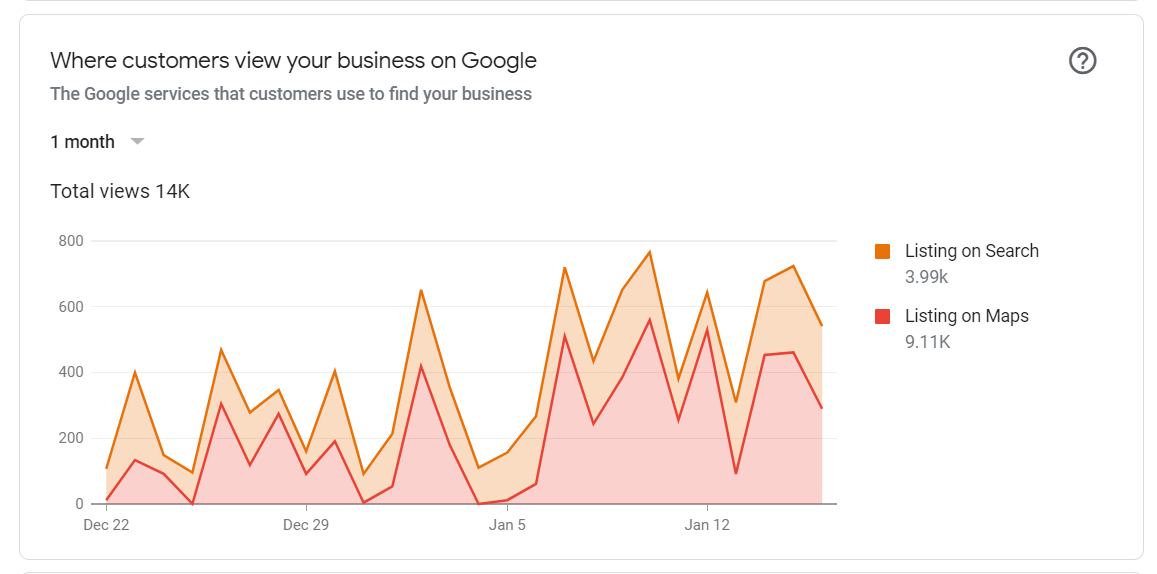
Maps is also where most people see your profile. For a transmission repair shop I ran SEO for as a side project, about two thirds of its profile views in one month came from Maps rather than the regular search results.
How Google ranks businesses on Maps
Google’s own help page says local results are mainly based on:
- Relevance: how well your Business Profile matches the search. Google says complete, detailed information helps it match you.
- Distance: how far you are from the searcher, or the location they searched.
- Prominence: how well known your business is. Google says this draws on things like how many websites link to you and how many reviews you have, and that more reviews and positive ratings can help.
It also says plainly that there’s no way to request or pay for a better local ranking.
What actually moves the needle
1. Get the basics of your Business Profile right
Google says verified businesses are more likely to show up, and that businesses with complete and accurate information are more likely to appear in local results.
- Verify your profile. My verification guide covers every method.
- Pick categories carefully. Your primary category should describe your main service, with secondary categories for the rest. See how to choose Google Business Profile categories.
- Fill in everything: hours, services, description, attributes, website and phone.
- Add real photos of your work and team.
2. Don’t break the guidelines chasing rankings
Some guides still suggest adding keywords to your business name. Google’s guidelines say unnecessary information in your name isn’t permitted and can get your profile suspended. Use your real-world name exactly as it appears on your signage. If you’re already suspended, here’s how to get reinstated.
3. Build reviews steadily
Reviews feed prominence directly. Ask every customer, the same way, with a direct link. My guides on getting more Google reviews and responding to negative reviews cover how to do it within Google’s rules.
4. Give Google a clear website
Your Business Profile links to your website, and the site is where you can explain each service in detail. Build a page for every main service, and pages for the main areas you serve if you work across several towns. That’s exactly what made the difference for Otter Landscapes: the site was planned around what customers search for.
5. Earn local mentions and links
Google names links from other websites as part of prominence. Real local links come from suppliers, trade associations, community groups, sponsorships and local press. Keep your business name, address and phone number consistent across directories too. My guide to local citations explains which listings matter and how to fix mismatches.
Why is my business not showing on Google Maps?
If you can’t find your business at all, work through these in order:
- Search your exact business name. If you appear for your name but not for your services, your profile exists and it’s a ranking problem, not a missing listing.
- Check verification. An unverified profile is less likely to show up.
- Check for a suspension. Suspended profiles disappear from Maps. Google lets you appeal.
- Check your category and details. If your category doesn’t match what people search, Google has no reason to show you.
- Check where you’re searching from. Distance matters. You may rank well near your office and not at all across town.
- Check for duplicates. Two profiles for the same business can cause problems with how your information shows. Google allows one profile per business.
Measure from more than one spot
Because distance is a ranking factor, your position changes depending on where the search happens. Before deciding whether something worked, check your main searches from several points around your service area, not only from your own office. Local rank tracking tools do this by checking rankings across a grid of locations.
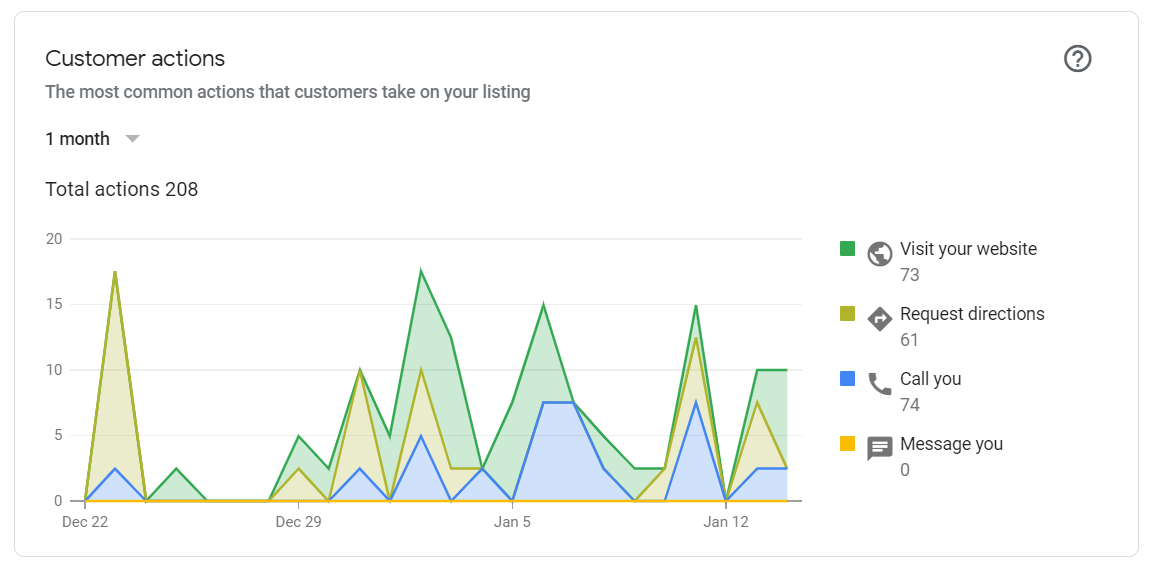
Track what matters as well: calls, direction requests and website clicks in your Business Profile performance report. Those numbers tell you whether better rankings are bringing in business.
If you only have an hour a week
Do these in order, and don’t move on until each one is done:
- Verify your profile and fix your name, category, hours and service area.
- Set up a review link and ask every customer from this week on.
- Reply to every review, new and old.
- Make sure your website has a clear page for your most valuable service.
- Fix your listing on the biggest directories so your details match exactly.
That order puts the fixes that affect relevance and trust first, and the slower, ongoing work last.
Keep going
Ranking higher on Google Maps is rarely one fix. It’s a complete profile, a steady flow of reviews, a site that clearly explains your services and areas, and a business that other local sites mention. My local SEO guide for small businesses puts it in order, and the local SEO checklist gives you 40 things to check.
If you’d like the same approach that took Otter Landscapes from #14 to #1, that’s what my local SEO service does.
