

How to change the font in WordPress depends on your theme, but the bigger question is how many fonts you end up loading. Every font family is a file your visitors download before the text looks right. I changed fonts on a test site running WordPress 7.1.3 and measured the files each choice added.
Block themes: Styles → Typography
Open Typography
Go to Appearance → Editor → Styles and click Typography.
Pick a typeset, or set fonts yourself
Typesets are ready-made pairs, one font for headings and one for text. Click one to preview it. To choose separately, click Text or Headings under Elements and pick a font.
Save
Click Save. The new fonts apply across the whole site.
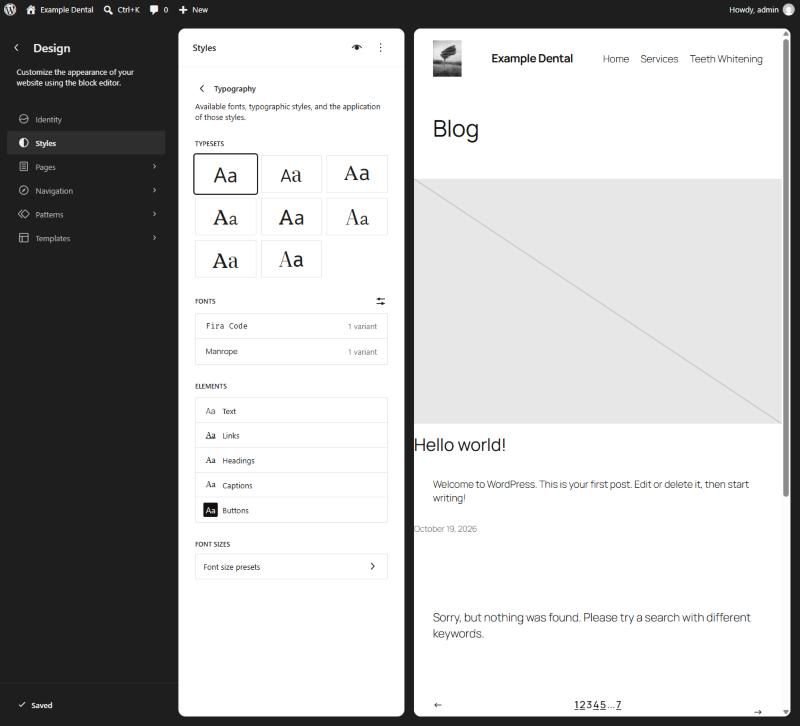
Twenty Twenty-Five offers eight typesets, each named after its fonts, such as “Beiruti & Literata” or “Roboto Slab & Manrope”. The default uses Manrope for everything.
What each choice costs
I measured the font files a service page downloaded before and after switching typesets:
| Typeset | Font files downloaded | Total size |
|---|---|---|
| Default (Manrope) | 1 | 53 KB |
| Beiruti & Literata | 2 | 278 KB |
Two families instead of one made the fonts more than five times heavier. Two things are worth knowing from the test:
- The browser only downloads what a page uses. Literata listed 18 styles, and the browser fetched just one, the weight my test page used. Extra weights you never use don’t cost anything.
- Each extra family does cost. A third font for buttons or quotes is another file on every page. One font, or one for headings and one for text, is plenty for a business site.
If your site already feels slow, fonts are rarely the biggest problem; see how to speed up a WordPress site.
Adding a font that isn’t in the list
In the same Typography panel, click the Manage fonts icon next to Fonts. The Fonts window has three tabs:
- Library: the fonts you have, and how many of each font’s styles are switched on.
- Upload: add your own font files (.ttf, .otf, .woff or .woff2).
- Install Fonts: choose from Google Fonts. On my test site this tab appeared a few seconds after the window opened, once the list had loaded.
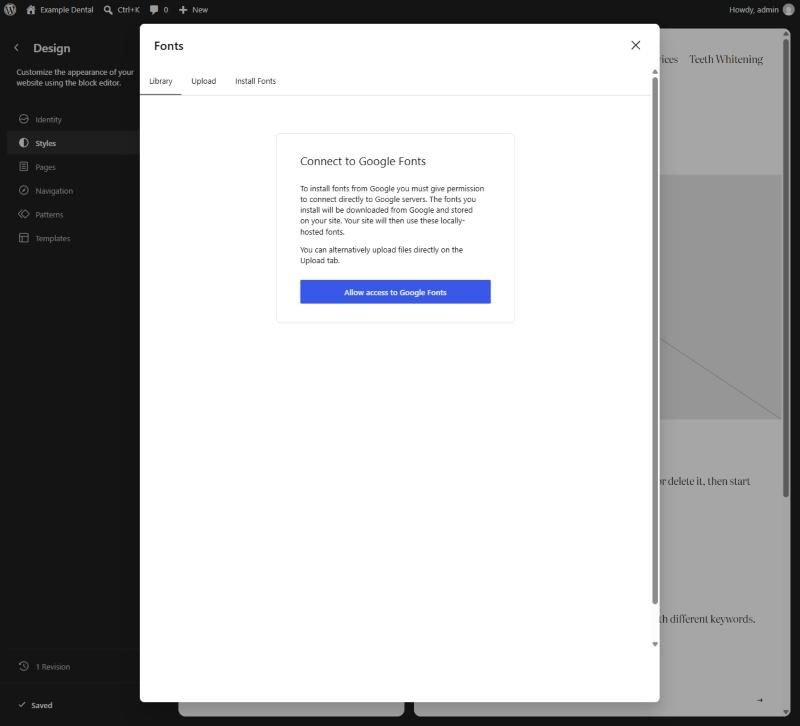
Before it connects, WordPress explains that fonts you install are downloaded from Google and stored on your site, and that your site then uses those locally hosted copies. That’s better for speed and privacy than loading fonts from Google on every visit. After installing, switch on only the styles you need in Library. On my test site, applying a typeset had switched on all 16 Literata styles.
Classic themes: a few lines of CSS
Classic themes often have no font setting at all. Twenty Twenty-One’s Customizer has Site Identity, Colors and Excerpt settings, but nothing for fonts. It uses the visitor’s own system fonts, so it downloads no font files.
Its stylesheet reads two settings you can override in Appearance → Customize → Additional CSS:
:root {
  --font-base: Georgia, "Times New Roman", serif;
  --font-headings: Georgia, "Times New Roman", serif;
}
The browser tries each font in the list in order and uses the first one the device has, so this changes the look without adding a download. Other classic themes use their own setting names, so check your theme’s documentation. Font plugins work too, but some load fonts from Google on every visit, which is exactly the extra download this guide is about avoiding.
Keep it to two
Pick one font for headings and one for text, use the weights you need, and let WordPress host them. If you want a font set up properly across your site, or your theme fights you on it, that’s part of my WordPress development work.
