

How to delete a WordPress account depends on which WordPress you mean, and most people searching mean one of three different things. Each is deleted in a different place, and each deletes different things. I tested the one that happens inside your own website on a WordPress 7.1.3 test site, and checked the other two against WordPress.com’s and WordPress.org’s own instructions.
Which account do you have?
| You log in at | It’s a | Jump to |
|---|---|---|
| wordpress.com | WordPress.com account, which may hold sites, plans and domains | WordPress.com |
| your own domain, e.g. yoursite.com/wp-admin | A user on your own WordPress site | Your own site |
| wordpress.org (forums, plugin reviews) | A WordPress.org community account | WordPress.org |
Closing a WordPress.com account
This deletes every site in the account, so export anything you want to keep first.
Remove every purchase and domain
Go to your purchases and remove, not just cancel, every plan, add-on and domain. WordPress.com’s support page says a canceled subscription still counts until it expires, and you can’t close the account while a domain is still on it. Transfer a domain to another registrar first if you want to keep it.
Open your account settings
Hover over your name at the top right and choose My WordPress.com account.
Delete the account
Scroll to the bottom, click Delete your account permanently and confirm.
What happens next, according to WordPress.com:
- All your sites and content are deleted.
- You can’t use the same email for a new account for 30 days.
- Your username is retired permanently.
- You lose the login for services that use it, including Gravatar and WooCommerce.com, and Jetpack disconnects from any self-hosted sites.
- You can restore the account within 30 days using the link in the email you receive. After that it’s gone.
If you only want to stop paying or remove one site, WordPress.com offers both without closing the whole account.
Deleting a user from your own WordPress site
If your site is on your own hosting, there’s no single “WordPress account”. Each person has a user on that site, and an Administrator can delete them.
Open Users
Go to Users → All Users, hover over the person and click Delete.
Decide what happens to their content
WordPress asks what to do with the pages and posts they wrote: Delete all content, or Attribute all content to another user.
Confirm
Choose, then click Confirm Deletion.
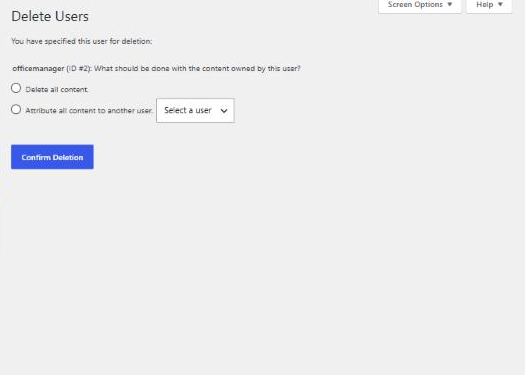
On my test site, I deleted an Editor account that had written an “Office Hours” page. I chose to attribute the content to the admin. The user was removed, and the page stayed live with the admin as its author. Choosing Delete all content instead would have removed the page, so read that screen carefully. It’s the step that loses work.
You can’t delete yourself here. On my test site, my own row offered only Edit and View. To remove your own account, have another Administrator do it, or create a new Administrator, log in as them and delete the old one. Make sure at least one Administrator account you can log in with is left.
If you want to delete the whole site rather than a user, that’s done with your hosting company, by removing the site or closing the hosting plan, not inside WordPress.
Deleting a WordPress.org account
The account you use for the WordPress.org forums and plugin reviews is separate from both of the above. WordPress.org deletes it through its Data Erasure Request form: enter your email, log in if asked, and accept the declaration to request permanent deletion.
One thing to know first: WordPress.org says this won’t erase your support forum activity. Your topics and replies stay, attached to an anonymized account.
Before you delete anything
- Export or back up content you might want later.
- Check who else logs in. On a business site, removing the only Administrator can lock everyone out. My guide to editing a site someone else built explains roles.
- Redirect pages you remove, so links to them don’t break; see how to delete a page.
If you’re taking over a site from a developer and want access tidied up, users removed and ownership in your name, that’s part of my WordPress development work.
